POS System for Mobile Phone Shops
Gadgets POS is a POS system for mobile phone shops: the till, the stock room and the repair bench in one system. It is not a mobile card reader (the pocket devices sometimes called mPOS). It is the software that runs a phone shop, from selling and repairing handsets to trading them in and tracking every IMEI.
Last reviewed: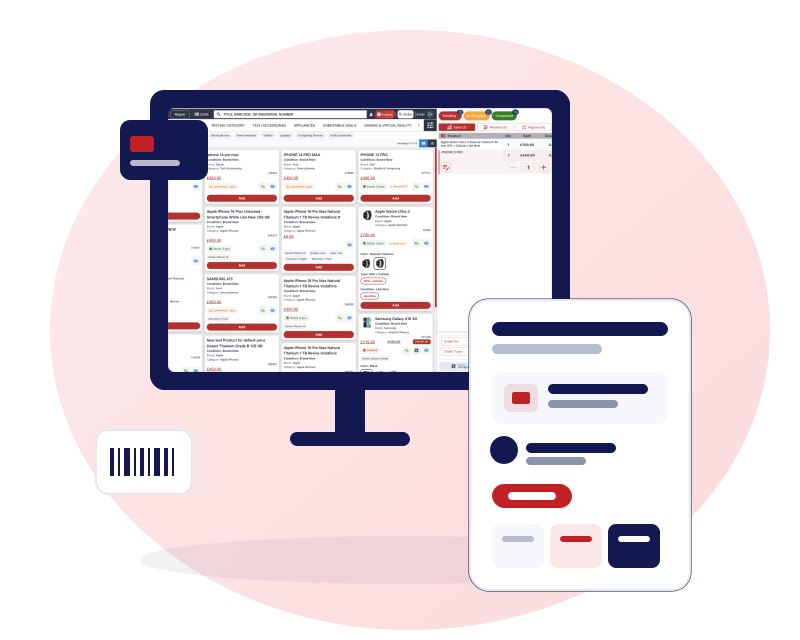
A POS system for mobile phone shops: what it needs to do
A phone shop does not sell tins of beans. Most of what is on the shelf is a single unit with its own IMEI, bought at its own price, and the same customer may walk in wanting a case, a screen repair and a trade-in on their old handset, all in one visit. A till that only knows quantities and barcodes has no good place to put any of that.
A generic retail POS can usually take the payment. The trouble starts behind the till: which unit did you actually sell, what did it cost you, who is fixing the other customer's phone, and what did you pay for the handset that came in as a trade-in. Five things decide whether a POS suits a phone shop:
Stock by unit
Each phone is held as its own unit with its IMEI or serial number, so you can sell it once and find it later. See IMEI inventory software.
Repairs on the same system
A repair job with a technician, a priority and a collection date, not a note on a pad. See phone repair shop software.
Trade-ins and part exchange
A customer's old phone is valued at the till, taken off the price and put straight into stock. See trade-in software.
More than one shop
One login, a switcher between shops, and stock that can move between them.
A website that matches the till
Selling, trade-in quotes and repair bookings online, from the same system. See POS with an online shop.
Sell, return, replace, trade in and repair on one order
In Gadgets POS these are not five separate screens. A sale, a return, a replacement, a trade-in and a repair can all sit on the same order and print on one receipt. A customer can trade in an old handset, buy a new one and a case, and book their cracked tablet in for repair, and pay the difference by splitting the payment between cash and card.
Returns are handled with the same care. The till asks whether the returned unit is faulty or not faulty, and the unit can be put back into sellable stock or kept out of it. Payments can be split across cash, card, bank transfer and gift card (see gift cards, vouchers and loyalty), and regular customers can run a credit account with a limit and a running balance. More on the till in point of sale features.
Every phone tracked by IMEI or serial number
Scan the IMEI or barcode and the phone goes onto the order. If that unit is already sitting in another open cart anywhere in your business, the system refuses it, so two members of staff cannot sell the same handset. You can search any IMEI across sales, returns and trade-ins when a customer comes back with a question.
Stock is costed first in, first out, and margin is worked out from the purchase each unit came from, so the profit you see on a used phone is based on what you paid for that phone. Stock records cannot be deleted. Only adjustments, sales, purchase receipts, returns and trade-ins move them, which leaves a trail you can check. This is stock control by IMEI. It is not a lost-phone tracker and it does not check IMEIs against blacklists.
Repairs and trade-ins without a second system
A repair is taken in with the device model, the IMEI, the fault, the price and any notes on its condition. You assign it to a technician (or an outside technician), set a priority and an expected collection date, and attach the parts you use from stock so the cost of the job is known. Jobs move across a board whose stages you define yourself.
A trade-in is valued at the till and netted off the sale. The traded-in IMEI becomes stock you can sell, with its cost recorded. Reports then show trade-ins by order, product and category, so you can see whether taking them in is paying off. Detail is on the repair and trade-in pages.
VAT margin scheme support for second-hand goods: Used and refurbished products are kept VAT-free at the till, VAT applies to products marked new, and VAT can be switched on or off for your business. See POS for second hand phones.
Your own online shop on the same stock
Gadgets POS can run a web shop on your own domain with three sections. Buy sells your new and used devices and accessories. Sell lets customers ask for a trade-in quote and choose how they would like to be paid. Repair shows your repair prices and takes appointments or mail-in repairs. The Buy section sells from the same product and stock records as the till, so a phone sold in the shop stops being available online.
The web shop is set up for you by our team rather than as a self-service sign-up, and you choose which of the three sections to switch on. Read more on POS with an online shop and in the guide Can one system run your shop and website?
Run several shops from one login
If you have more than one shop, you sign in once and switch between them. Reports can be filtered to a single shop or rolled up across all of them. Stock moves between shops by request and acceptance: one shop asks, the other approves, and the units arrive on the receiving shop's stock list. Daily closing can be run across several shops in one go.
Staff roles are detailed. You decide who can give discounts, process returns, take trade-ins, see reports or change prices, and you can hide fields from the people who do not need them. More in multi-store POS.
Hardware that works with it
Receipts print on thermal receipt printers using 58, 72 or 80 mm paper, or on A4. Labels print on Zebra and DYMO label printers, including labels carrying the IMEI barcode and repair labels. The system can send the command that opens a cash drawer from the receipt printer, and it works with barcode scanners that behave like a keyboard.
Gadgets POS runs in a browser, and there is also a desktop app for your till that opens your cloud account in its own window; both need an internet connection. Receipts can be printed, emailed as a PDF or shared on WhatsApp, and WhatsApp receipts sent as a PDF from your own business number are rolling out.
We supply a touch-screen terminal, an 80 mm receipt printer and a 2D scanner at one-off prices, and you can use your own instead. We have not tested every printer or scanner model, so tell us what you already own and we will confirm whether it works during your trial. Prices and detail are on touch screen POS hardware for phone shops, and UK shops can read the EPOS page.
Cell phone store or mobile phone shop: same system
In the US, Canada and Australia the same business is often called a cell phone store, and the software is called a POS rather than an EPOS. The way the shop works is the same: stock by unit, repairs, trade-ins and accessories. The till can be set to one of 14 currencies, including GBP, USD and EUR, so prices, reports and receipts follow it. US dollars are covered, but Canadian and Australian dollars are not among the 14, and the online shop shows prices and takes payment in pounds sterling only. The tax name and rate are yours to set, so a receipt can say VAT, GST or sales tax.
Gadgets POS does not calculate US state-by-state sales tax automatically, and the screens are in English only. Shops in Pakistan can read mobile shop software for Pakistan, which covers PKR prices and what is not built there. If you sell consoles, laptops and other gadgets as well as phones, see POS for gadget shops and POS for computer and laptop shops. If you also sell to other traders, read about software for phone wholesalers.
Questions mobile phone shop owners ask
Is this a POS for mobile phone shops or a mobile card reader?
It is a POS for mobile phone shops, meaning shops that sell and repair phones. It is not a mobile card reader (sometimes called mPOS), a small device for taking card payments on the move. Gadgets POS runs in a web browser or a desktop app at the counter, both needing an internet connection, and manages sales, stock, repairs and trade-ins. Card payments are recorded on the order alongside cash and bank payments.
Can the POS track phones by IMEI?
Yes. Each phone can be held as its own stock unit with its IMEI or serial number. You scan the IMEI to add it to an order, and a unit that is already in another open cart anywhere in your business is refused, so the same phone cannot be sold twice. You can search any IMEI across sales, returns and trade-ins. It does not check IMEIs against blacklists.
Can I sell new, used and refurbished phones in one system?
Yes. New, used and refurbished phones are products in the same stock list, and each unit keeps its own purchase cost, so profit on a used phone reflects what you paid for it. Phones you take in as trade-ins become sellable stock under their own IMEI. You can report sales by product, category or customer to see which lines earn the most.
Does it work for more than one shop?
Yes. Several shops sit under one login with a switcher. Reports can be filtered to one shop or rolled up across all of them, and stock moves between shops by request and acceptance rather than instantly. Staff roles control what each person can see and do, and daily closing can be run across shops in one go.
Can I run a repair counter and a trade-in desk on the same till?
Yes. Repairs and trade-ins are order actions, not separate modules. A repair job and a trade-in can sit on the same order as a sale, share one receipt and take split payments. Each repair records a technician, a priority and an expected collection date, and a traded-in phone goes into stock under its own IMEI, ready to sell.