EPOS System for Mobile Phone Shops
In the UK the till is called an EPOS: the electronic point of sale at your counter. Gadgets POS is a cloud EPOS system for mobile phone shops. It scans, takes split payments and prints receipts, with IMEI stock, repairs and trade-ins working behind the till, and labels and a cash drawer at the counter.
Last reviewed: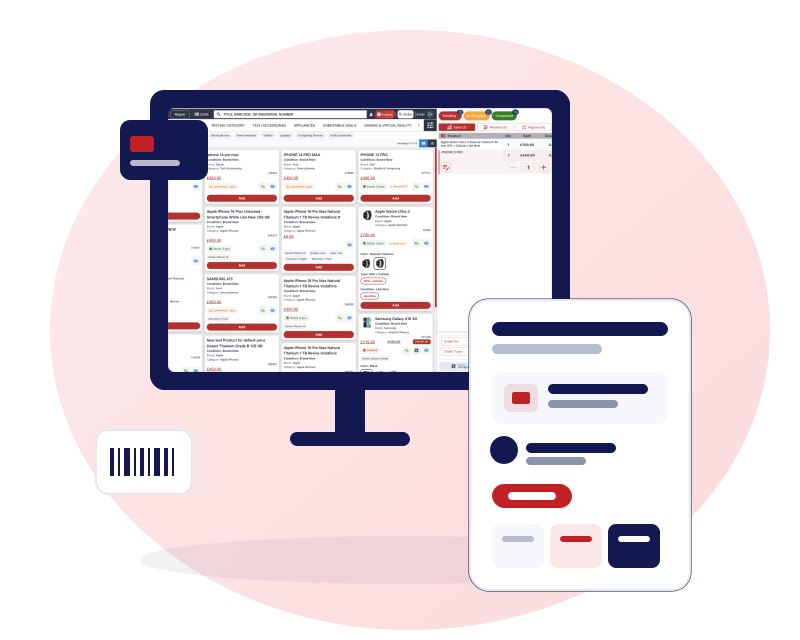
An EPOS system for mobile phone shops, built around phones
Most EPOS systems were designed for shops where every item of one kind is the same: a tin, a coffee, a haircut. A phone shop is different. The handset in the box has its own IMEI and its own purchase price, and the counter also has to deal with repairs left for a technician, old phones coming in as part exchange and the occasional return of a faulty unit.
Gadgets POS keeps all of that on one order and one receipt. You scan a handset, add a case, take an old phone in part exchange and book a screen repair for a second device, then take payment once. Behind the till, the stock, the repair board and the reports all update from the same order, so there is no second system to key it into at the end of the day.
If you would rather read about the whole product first, start with the POS system for mobile phone shops page.
The till: scan, split-pay, print
Scan a barcode or an IMEI and the item goes onto the order. If a unit is already in another open cart anywhere in your business, it is refused, which stops two staff selling the same phone. A busy counter can park an order on hold and come back to it, and the payment buttons have keyboard shortcuts for the fast path.
Split one payment across cash, card, bank transfer and gift card, and sell gift cards, vouchers and loyalty points.
Run credit accounts for regular customers, with a limit and a running balance.
Print a receipt, email it to the customer as a PDF, or share it on WhatsApp. Sending it as a PDF from your own WhatsApp Business number is rolling out.
Return or replace a unit on the same order, with a prompt asking whether it is faulty.
Give staff only the rights they need, such as discounts, returns or price changes.
Card payments
Card payments are recorded on the order next to cash and bank payments. Tell us which card machine you use and we will explain, during your demo, how the sale and the card payment line up.
Hardware: receipt and label printers, scanners, cash drawer
Receipts print on thermal receipt printers using 58, 72 or 80 mm paper, or on A4 for invoices. Labels print on Zebra and DYMO label printers, including labels with an IMEI barcode and repair labels. The system can send the command that opens a cash drawer connected to your receipt printer, and it works with barcode scanners that behave like a keyboard.
Gadgets POS runs in a browser, and there is also a desktop app for your till. It opens your cloud account in its own window, so it needs an internet connection like the browser version, and on Windows it sends receipts and labels to the printer port you set.
We supply a 15.6-inch touch-screen terminal, an 80 mm thermal receipt printer and a 2D barcode scanner at one-off prices, or you can use your own. We have not tested every make and model, so tell us what you already own and we will confirm whether it works. Prices and set-up notes are on the touch screen POS hardware page.
IMEI and serial stock behind the till
A UK phone shop needs to know which handset it sold, to whom, and what it cost. Each phone in Gadgets POS is held as its own unit with its IMEI or serial number. Stock is costed first in, first out, so the profit on a sale reflects the purchase that unit came from, and stock records can only be moved by an adjustment, sale, purchase receipt, return or trade-in; they can never be deleted.
You can run a stock check by scanning, and search any IMEI across sales, returns and trade-ins. The system does not check IMEIs against blacklists or lock databases. The detail is on the IMEI inventory software page.
VAT on the till
You set up your tax rates once, give each product its rate, and choose whether the price you enter includes tax or not. The reports show the tax breakdown, so your accountant has figures to work from.
VAT margin scheme support for second-hand goods: Used and refurbished products are kept VAT-free at the till, VAT applies to products marked new, and VAT can be switched on or off for your business. When VAT is on, receipts and A4 invoices show the VAT charged and your VAT number once you have added it. When VAT is off, no VAT is added to sales and no VAT amounts are printed.
Gadgets POS does not work out the VAT due on your margin, print margin-scheme invoice wording or keep a margin-scheme stock book, so ask your accountant how to record and report it. The financials page shows what the reports contain.
Daily closing at the end of the day
At closing time the daily closing report totals the day's sales, trade-ins, returns and expenses. It separates money taken in the shop that day from funds you have set aside, so a supplier payment made from reserved cash does not muddy the day's takings. Owners with several shops can close all of them in one go.
If you want a plain checklist for the counting itself, there is a phone shop end-of-day cash up checklist written for exactly that.
From one shop to a chain
A second shop does not mean a second system. You sign in once and switch between shops. Reports can be filtered to a single shop or rolled up, stock moves between shops by request and acceptance, and staff roles stay consistent. Read more in multi-store POS, or see what plans look like on the pricing page.
EPOS questions from UK phone shops
What is the difference between an EPOS and a normal POS?
In practice, nothing. EPOS (electronic point of sale) is the UK name for a modern till system, and POS is the shorter term used elsewhere. What matters is what sits behind the till. Gadgets POS adds IMEI stock, repairs, trade-ins and an online shop to the checkout, which basic retail tills often leave out.
Which receipt and label printers work?
Receipts print on thermal printers using 58, 72 or 80 mm paper, or on A4. Labels print on Zebra and DYMO label printers, including IMEI barcode and repair labels. We have not tested every model, so tell us which printers you own or plan to buy and we will confirm they work. We also supply an 80 mm thermal receipt printer for £80, one-off.
Does it handle VAT?
Yes. You define your tax rates and set each product to include or exclude tax. Used and refurbished products are kept VAT-free at the till, VAT applies to products marked new, and VAT can be switched on or off for your business. When VAT is on, receipts and A4 invoices show the VAT charged and your VAT number once you have added it. When VAT is off, no VAT is added to sales and no VAT amounts are printed.
Does Gadgets POS support the VAT margin scheme for second-hand goods?
Yes, in part. Used and refurbished products are kept VAT-free at the till, VAT applies to products marked new, and VAT can be switched on or off for your business. Gadgets POS does not work out the VAT due on your margin, print margin-scheme invoice wording or keep a margin-scheme stock book, so ask your accountant how to record and report it.
Can the EPOS run repairs and trade-ins as well as sales?
Yes. Sales, returns, replacements, trade-ins and repairs can all sit on the same order and print on one receipt. Each repair records a technician, a priority and an expected collection date, and a traded-in phone goes into stock under its own IMEI, ready to be sold, with its cost recorded.